🔑 Software keys sent via WhatsApp or E-mail within 24 hours (1 Day) ! ⏳ If not received, Contact us! ! 📬

 Recently Updated
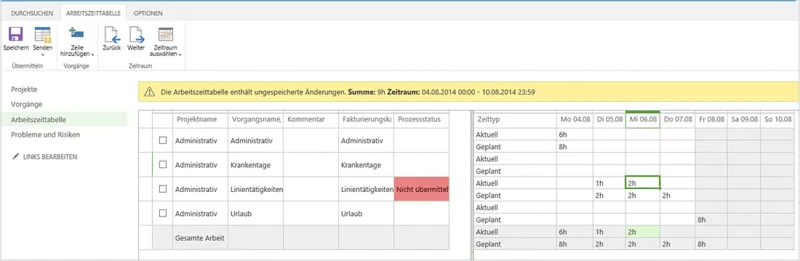


Microsoft Project Online Essential is a powerful cloud-based solution that is designed for team members who do not know the full details of projects, they can collaborate on.
It works with allocated work that gives updates on the assigned tasks and submits timesheets. Through this, team members can track project issues and risks through a web-based interface. It is best suited for team members who are responsible for task execution rather than project planning.
Key Features:
- Task Management: Through this, team members can view and update their assigned tasks that ensuring real-time tracking of project progress
- Timesheet Submission: With the help of this feature, users can log work hours and submit timesheets for approval that help to keep track of project and payroll management.
- Issues & Risk Tracking: With the help of these features, users can keep track and monitor project-related issues and risks and make problem resolution.
- Seamless Integration: It seamlessly integrates with Microsoft Teams and SharePoint, which helps in document sharing and team communication efficiently.
- Web-based Access: It provides a web-based interface that allows users to work from anywhere and keep updates on projects and update timesheets.
- Integration with Project Plan 3 & Plan 5: Must be set up with Plan 3 & 5 subscription, ensuring a structured workflow within an organization.
Why Buy From Us?
- Our expert team always helps you to choose the right plan according to your project management needs.
- We provide a hassle-free setup for the client for smooth onboarding and quick configuration for deployment.
- Our team provides personalized support to the user for installation, integration, and troubleshooting.
- We offer the best pricing according to the market price with exclusive offers and discounts.
- We provide training and consultation to the users for access to the resources and expert advice to maximize efficiency.
- We assist in integrating with Microsoft Teams, 365, and other tools.
Redemption Guide:
- Firstly, buy Microsoft Project Online Essentials from an authorized Microsoft reseller or the official Microsoft website.
- Before buying it, ensure that your organization has an active Project Plan 3 or plan 5 subscription, because it is not a standalone product.
- Sign in to the Microsoft 365 admin center. And add your credential details.
- Navigate to billing and licenses, check that your project’s Online Essentials subscription appears in your account..
- You received a product key in your email.
- If you received a product key then go to billing and your product key and redeem a product key, enter your product key, and follow the instructions.
- Assign a license to the users who need access to Project Online Essentials.
- Click assign and save changes.
Comparison Table:
| Features | Project Online Essentials | Project Plan 3 | Project Plan 5 |
| Best For | Team members updating tasks and timesheets | Advanced project management | Enterprise-level project portfolio management |
| Cloud-Based Access | Yes | Yes | Yes |
| Standalone Product | No | Yes | Yes |
| Gantt Charts & Grid Views | No | Yes | Yes |
| Task Management | Yes | Yes | Yes |
| Timesheets Submission | Yes | Yes | Yes |
| Issue & Risk Tracking | Yes | Yes | Yes |
| Resource Management | No | Basic | Advanced |
| Financial & Demand Management | No | Basic | Advanced |
| AI-Powered Automation | No | No | Yes |
| Portfolio Management | No | No | Yes |
| Security & Compliance | No | Yes | Yes |
| Microsoft Teams Integration | Yes | Yes | Yes |
FAQs
What is Microsoft Project Online Essentials?
Microsoft Project Online Essentials is a cloud-based solution that is basically designed for users who keep updates on tasks and submit timesheets, and keep tracking on risks and resolve issues.
Who should use Project Online Essentials?
It is ideal for team members who keep updates on the tasks and submit time entries, but do not require full project planning and scheduling capabilities.


Reviews
Clear filtersThere are no reviews yet.