🔑 Software keys sent via WhatsApp or E-mail within 24 hours (1 Day) ! ⏳ If not received, Contact us! ! 📬

What Is Rendering Software? List of famous rendering softwares in 2025

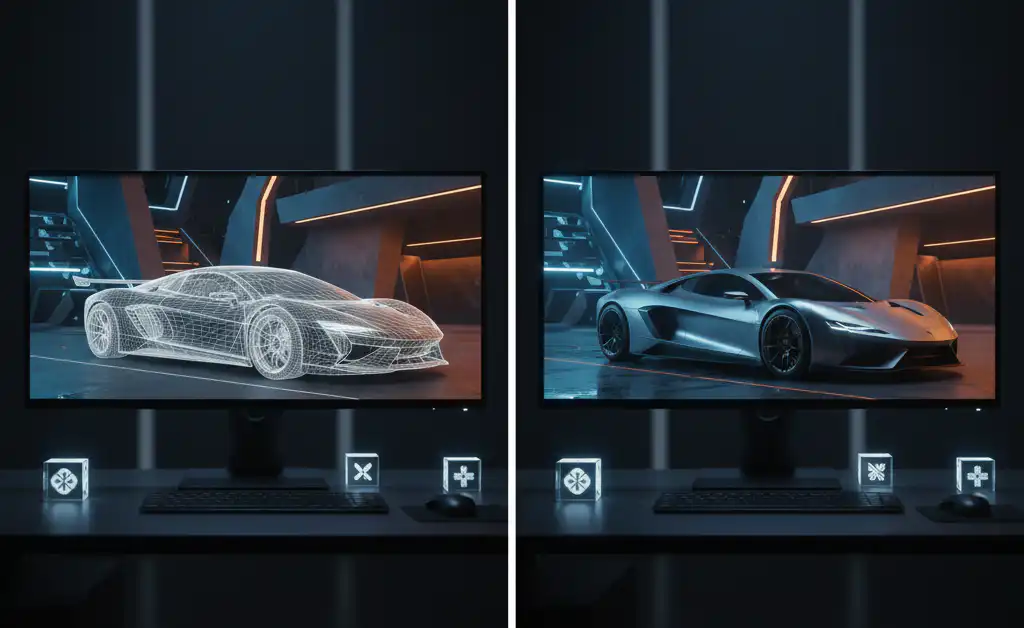
In the world of digital design, architecture, animation and visual effects, rendering software plays an important role in bringing ideas into life. Whether it is a photorealistic image of the future skyscraper, a film transforms a lifelong character, or a smooth product prototype, rendering software 3D models into polish visual outputs through light, shading, texture, and perspective techniques.
By 2025, AI, GPU acceleration, and thanks to the developments in real -time rendering technologies, the rendering tools have become more advanced, comfortable and powerful. But with so many options available, choosing the right rendering software depends on your project type, industry and hardware capabilities.
In this, we will break down what the software is, how it works, and provide an accurate list of the most popular and powerful rendering tools in 2025-from the engine of world-time to the offline renders used by top professionals worldwide.
Define Rendering Software?
Rendering software is a type of computer program used to convert 2D or 3D models into high quality images or animations. It simulates real lighting, shadow, texture and visual effects to generate lifetime or styled scenes.Popular rendering tools include V-rays, blender, lumion, keyshot and arnold, offering unique characteristics to suit each specific industries and needs.
What are the best Rendering tools that help in 2D and 3D models?
| Rendering Tool | Best For | Key Features | 2D/3D Support |
| Blender | Animation, VFX, Design | Free, open-source, Cycles & Eevee engines | ✔️ 2D (Grease Pencil), ✔️ 3D |
| V-Ray | Architecture, Interior Design | Photorealistic, plugin-based for SketchUp, Revit, etc. | ❌ 2D, ✔️ 3D |
| Lumion | Architectural Visualization | Real-time rendering, fast scene creation | ❌ 2D, ✔️ 3D |
| Enscape | Architecture & Engineering | Real-time, VR support, live sync with CAD tools | ❌ 2D, ✔️ 3D |
| KeyShot | Product Design & Visualization | Fast, easy-to-use, real-time global illumination | ❌ 2D, ✔️ 3D |
| Arnold | Film, TV, VFX | Ray tracing, supports complex lighting | ❌ 2D, ✔️ 3D |
| Cinema 4D | Motion Graphics, Animation | Seamless integration with Adobe tools, Redshift support | ✔️ 2D (motion), ✔️ 3D |
| After Effects + Element 3D | Motion Design, Effects | 2.5D animation, 3D plugin for VFX | ✔️ 2D, ✔️ 3D (via plugin) |
What is Rendering Engines?
The rendering engine is the main ingredient to render software responsible for converting 3D or 2D digital models into final images or animations. They simulate how the light interacts with objects, materials and environment to create realistic or style scenes. The rendering engine calculates light, shade, texture, reflection and other visual effects to generate a final view.
There are two main types of rendering engine: real -time and offline. The real-time engine (e.g. ewe or unrealistic engine) is adapted to speed and is used in game and interactive applications. Offline engines (e.g. V-ray, bicycle, or arnold) focus on high quality, photorealistic results and are often used in architecture, film and animation. Some engines use GPU for rapid rendering, while others rely on CPU for more accurate calculation. The option of rendering engine can greatly affect your visual output quality, speed and style.
Describe the difference between Offline and Real-time rendering?
| Feature | Offline Rendering | Real-Time Rendering |
| Speed | Slow (minutes or hours per frame) | Fast (real-time, milliseconds) |
| Quality | Ultra high, photorealistic | Moderate to high, optimized for performance |
| Interactivity | Not interactive | Fully interactive and dynamic |
| Use Cases | Film, animation, product design, architecture | Games, VR/AR, live architectural walkthroughs |
| Lighting & Effects | Complex (ray tracing, GI, reflections) | Simplified or approximated |
| Hardware Needs | High-end CPUs/GPUs | Gaming or mid-range GPUs |
| Examples | V-Ray, Arnold, Cycles, Corona | Eevee, Enscape, Lumion, Unreal Engine |
Describe Lumion with best points?
- Real-Time 3D Rendering Software for Architecture, Landscape and Urban Design
- CAD and 3D models convert to photorealistic images, videos and 360 ° panorama
- Provides a huge library of materials, objects, sky, lighting and special effects
- Revit, sketchup, supports live synchronization with devices like rhino and autoCAD
- Fast rendering speed and user friendly interface
- Helps architects and designers imagine their projects during the design process
- Smooth performance and high quality output require a powerful GPU
Explain overview of V-ray?
The V-ray is a professional rendering engine developed by the Chaos Group, which is known for the production of high quality, photorealistic images and animations. It directly integrates popular 3D modeling software such as sketchup, Revitt, 3DS Max, Rhino and Maya, making this design a spontaneous part of the workflow. V-rays are widely used in architecture, interior design, film, gaming and product visualizations due to its advanced lighting, shading and material abilities. It supports both CPU and GPU rendering, causing flexibility to the user’s hardware and project needs. With features such as interactive rendering, physically accurate materials, global lights, and cloud rendering via Cass cloud, V-ray helps users to create a lifetime view when optimizing speed and performance.
Define the rendering workflow step by step?
| Stage | Description |
| 1. Modeling | Modeling is used to create models that help to easily generate and create 3D geometry using tools like SketchUp, Revit, Blender, or 3ds Max. |
| 2. Texturing & Materials | Users can easily the texture and materials of models by applying the surface materials such as wood, metal, glass, using built-in or custom shaders. |
| 3. Lighting Setup | Add and adjust natural or artificial lights, including HDRI and IES profiles. |
| 4. Camera Placement | Position virtual cameras; set angle, depth of field, and focal length. |
| 5. Rendering Engine Setup | You can easily select the rendering engine (V-Ray, Arnold, Lumion) and configure quality settings. |
| 6. Test Renders | Run quick, low-res renders to preview and adjust lighting, materials, or views. |
| 7. Final Rendering | Render the scene at full resolution with all settings optimized. |
| 8. Post-Processing | Edit in software like Photoshop or After Effects for color correction, effects. |
| 9. Output Delivery | Export final images, videos, or 360° tours for presentations or clients. |
Explain 3D rendering ?
3D rendering is the process of converting a digital 3D model into a two-dimensional image or animation that looks realistic or visually in style. It simulates real -world lights, textures, shadows and materials to create virtual objects or lifestyle visuals from the atmosphere. This technique is widely used in architecture, interior design, product visualization, gaming and film, before they are physically made. There are two main types of 3D rendering: real-time rendering, which are used in interactive applications such as video games and virtual reality; And offline rendering, which is slow, but produces highly detailed, photorealistic results for use in films, animations and professional design presentations.
Must read: How to Download & Install Autodesk Software Safely
Here is the table of use cases of Rendering
| Industry | Use Cases |
| Architecture & Interior Design | – Visualize buildings and spaces before construction – Create photorealistic walkthroughs – Present design concepts to clients |
| Gaming | – Real -Time Rendering for Interactive Gameplay – Design Realistic Environment and Varna – Support VR/AR Gaming Experience |
| Film & Animation | Create CGI, VFX, and animated scenes – Blend digital elements with live footage – render render render lighting and motion |
| Product Design | – Visualize prototypes and product concepts – Explore materials, textures, and finishes – Produce marketing-ready product visuals |
| Advertising & Marketing | – Create 3D product ads and brand visuals – Render promotional animations and explainer videos – Generate eye-catching content for social media |
| Virtual & Augmented Reality | – Enable immersive VR walkthroughs – Simulate environments for training and education – Visualize products in AR for e-commerce |
| Scientific & Medical | – Render anatomical models and simulations – Visualize scientific data and medical procedures – Create educational and research visuals |
Explain the architecture of Rendering Software that is used in 3D and 2D architecture?
| Software | Best For | Key Features |
| Lumion | Real-time rendering for architects | Easy to use, live sync with CAD tools, vast content library, fast rendering |
| V-Ray | Photorealistic architectural visualization | High-quality output, advanced lighting/materials, integrates with SketchUp/Revit |
| Enscape | Real-time walkthroughs and VR | Live rendering inside Revit, SketchUp, ArchiCAD; supports VR & easy setup |
| Twinmotion | Real-time rendering with Unreal Engine power | Drag-and-drop assets, fast rendering, BIM-compatible |
| Blender | Free and customizable visualizations | Open-source, powerful rendering with Cycles & Eevee, good for stills & animation |
| Corona Renderer | High-end interior/exterior visualization | Easy-to-use UI, photorealistic quality, CPU-based rendering |
| 3ds Max + V-Ray | Advanced architectural scenes | Full control over modeling and rendering; great for complex urban designs |
| Revit (with Enscape or V-Ray) | BIM modeling + rendering | Native BIM tools with powerful rendering plugins for presentations |
| D5 Render | Real-time rendering with AI features | Fast previews, realistic lighting, and smooth animation rendering |
FAQs:
What is software rendering?
Rendering software is a device that replaces 3D models by imitating light, material, shadow and texture in 2D images or animations. It helps in creating photorealistic or styled scenes used in industries such as architecture, film, gaming and product design.
What are the types of rendering?
- There are two main types:
- Real-time rendering: Video games and interactive applications (eg, unrealistic engine, unity) are used.
- Offline rendering: Films, architecture and product designs (eg, V-ray, Arnold) are used for high quality, photorealistic output.
Is it only providing software for professionals?
No. While professionals use advanced equipment, beginner-friendly and free options are available-especially for blender-nests, hobbyists and freelancers.