🔑 Software keys sent via WhatsApp or E-mail within 24 hours (1 Day) ! ⏳ If not received, Contact us! ! 📬

 Recently Updated




Nuance Dragon Home 15 is a voice identity/dictation software for Windows that allows you to convert spoken words into written text, control your PC with voice, and streamline your writing and computing workflow. It is aimed at the non-professional users-home, students, writers, or those who want an easy way to get a lesson on screen without typing.
With Dragon Home 15, you can navigate documents, emails, web materials, and Windows apps by voice command. The system “learns” your speech pattern over time to improve accuracy. Because it is a local installation (not cloud-based), you do not require a constant internet connection after installed and configured.
Product Overview:
Nuance Dragon Home 15 is a reliable speech recognition software for Windows that turns your voice into text with remarkable speed and accuracy. Powered by advanced deep learning technology, it is consistently suited to your speaking style, pronunciation, and environment to improve performance over time. Perfect for students, writers, professionals, or home users, Dragon Home 15 allows you to free your documents, email, and web content by controlling your computer with simple voice commands. This makes computing more convenient and accessible every day.
Key Features:
- Advanced speech recognition – converts its voice into a lesson with high accuracy and adapts to your pronunciation and environment.
- Set up three times faster than typing on the keyboard compared to typing.
- Open a hands-free control application, browse the web, send emails, and manage tasks using simple voice commands.
- Smart Learning – Software improves over time because it learns your unique vocabulary and speaking style.
- Seamless Integration – Microsoft works smoothly with popular Windows applications such as Outlook and web browsers.
- Playback and improvement – review the text fixed with the playback tool for easy proofreading and error improvement.
- A quick setup with the user-friendly interface-minimum training is required so that you can start giving instructions immediately.
- Touchscreen support – compatible with touchscreen PC and tablet for joint voice and touch control.
- Flexible microphone options-Use an underlying or external microphone for better results.
Why Buy From Us?
- 100% real license – authentic software with full features and reliable activation.
- Once purchases-one time pay and enjoy permanent access, no hidden fees.
- Instant Digital delivery – Get your download link and license key after purchase.
- Cheap pricing – competitive rates that save you money compared to retail.
- Safe checkout – safe and reliable payment methods for peace of mind.
- Dedicated support – whenever you need it, help with installation, activation, and setup.
- Reliable sellers – a proven track record of giving quality software and customer satisfaction.
Redemption Guide:
- Complete your shopping – after checkout, you will get an email with your license key and download link.
- Check your email – detect delivery email in your inbox (and if necessary, spam/junk folder).
- Download the installer – Click on the safe link to download the Dragon Home 15 setup file for Windows.
- Prepare your PC – make sure your system meets the minimum requirements and closes unnecessary applications.
- Run the installer-double-click on the setup file, and follow the on-screen prompts to install the software.
- Enter the license key – When indicated, input your unique license key to activate your copy.
- Complete setup – allow installation to eliminate and restart your PC if necessary.
- Configure your microphone with the underlying setup wizard for microphone setup-surviving accuracy.
- Create the user profile – personalize the dragon by creating your voice profile and allow it to be favorable to your speech.
- Start dictating-open your favorite apps (Word, Email, Browser) and start using Dragon Home 15 Hands-Free.
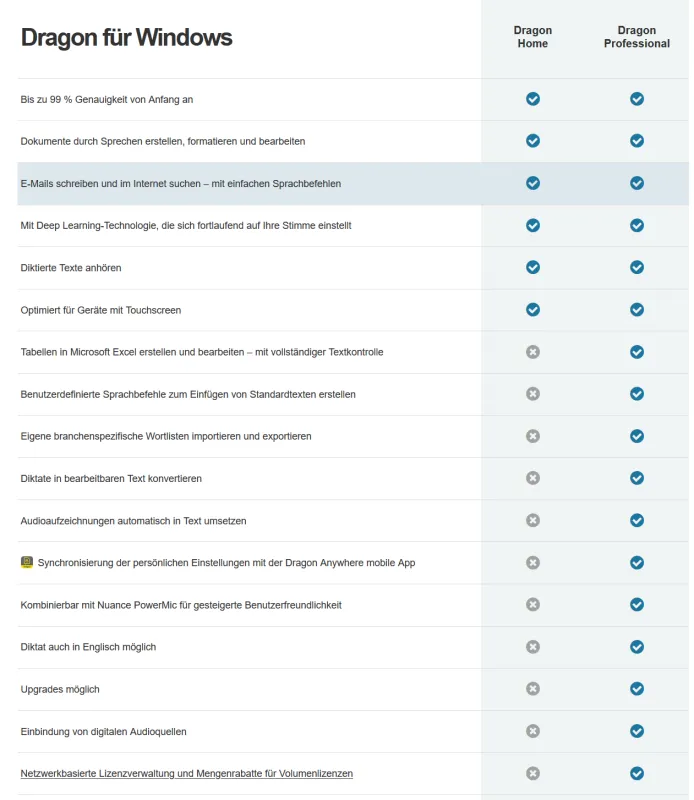
Comparison Table:
|
Feature |
Dragon Home 15 |
Windows Speech Recognition / Dictation |
|
Accuracy |
Higher accuracy most of the time — adapts to your voice, accent, and environment |
Decent out-of-the-box accuracy, but can struggle more with background noise or unusual accents |
|
Speed |
Fast dictation, optimized for voice-to-text with fewer errors and more efficiency |
Slower, more corrections needed; commands sometimes misrecognized |
|
Voice Commands / Control |
A broad set of voice-based commands, better support for dictation, editing, and controlling apps |
Basic set of commands; more limited control of OS or apps |
|
Vocabulary / Learning |
Learns over time; allows adding custom words/terms to improve recognition |
More limited ability to customize vocabulary; fewer learning or adaptation features |
|
Custom Commands / Automation |
Allows some customization (depending on version), such as correcting formatting, special commands |
Very limited; mostly basic built-in commands |
|
Transcribing Audio Files / Recordings |
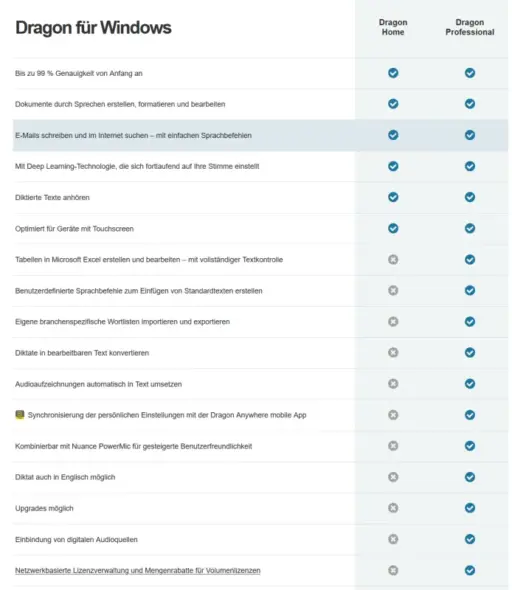
In more advanced Dragon versions (Professional), yes; the Home version is more restricted |
Generally not supported; built for live dictation more than file transcription |
|
Ease of Setup |
More involved initially (microphone setup, profile), but once configured works very well |
Very easy: minimal setup needed; built into OS |
|
Cost |
Paid product; higher cost, but with more features |
Free, built into Windows, so no extra cost |
|
Support & Updates |
Regular updates, support from Nuance, documentation, and features depend on the product version |
Maintained by Microsoft as part of Windows updates; fewer specialized features, but well supported |
|
Best Use Case |
For users who dictate often, need high accuracy, custom vocabulary, and want professional-level results |
Casual dictation, infrequent use, or for users who want something built-in without paying |
Frequently Asked Questions
Do I need an internet connection to use Dragon Home 15?
No, once it is established and active, the Dragon Home locally makes 15 runs on your computer, so you do not need to stay connected to the Internet.
Can I use Dragon Home 15 with Microsoft Word and Outlook?
Yes. It integrates with popular Windows apps such as Word, Outlook, and a web browser for smooth dictation and editing.
Does Dragon Home 15 work with many users?
No. It is designed for a single user profile. If you need several profiles, you will need a Dragon Professional.
Why should I buy Dragon Home 15 from the Element Key?
With immediate delivery and reliable customer aid to help with the setup and activation of elements, it provides 100% actual software at a competitive price.


Reviews
Clear filtersThere are no reviews yet.