🔑 Software keys sent via WhatsApp or E-mail within 24 hours (1 Day) ! ⏳ If not received, Contact us! ! 📬

Autodesk Software Complete Guide: Every Product for Engineers, Architects & Designers (2026)

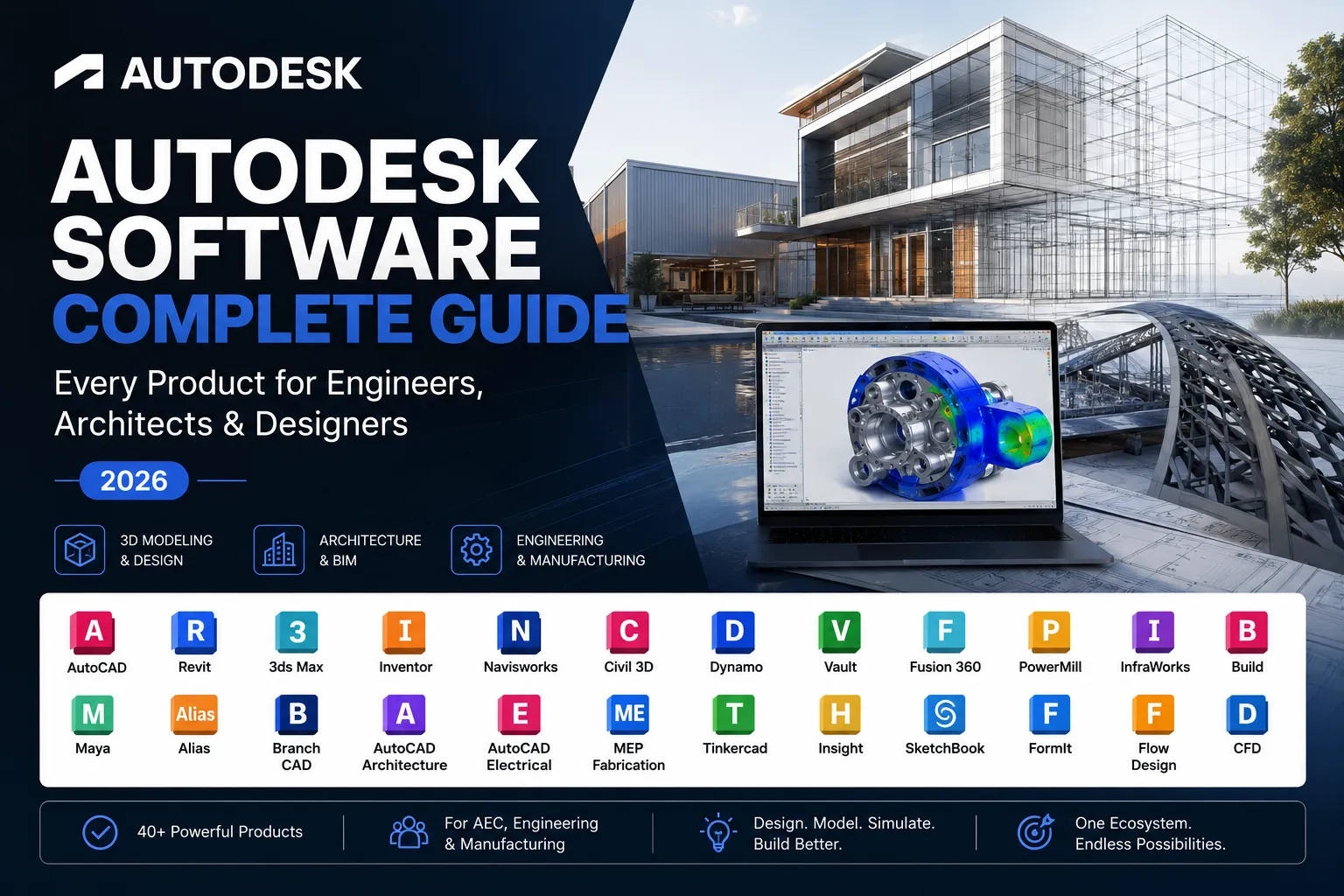
If you work in engineering, architecture, design, or construction, Autodesk software is likely already shaping how you work — or it will be soon. For over four decades, Autodesk has built the tools that define how the world designs, builds, and creates. From drafting a floor plan to simulating a structural load to producing a Hollywood-quality visual effect, Autodesk’s ecosystem covers every corner of the design industry.
This Autodesk software complete guide 2025 walks through every major product, explains exactly who each tool is built for, and helps you pick the right license without overspending. Whether you’re an architect pursuing a smarter BIM workflow, a mechanical engineer needing precise 3D modeling, or a student stepping into the design world, knowing the full Autodesk products list engineers and architects rely on is where it starts.
When you’re ready to buy, Elements Keys is where professionals come first. Elements Keys is a trusted digital platform specializing in genuine, commercially licensed Autodesk software — including 3ds Max, Advance Steel, the AEC Collection, Arnold, and All Apps bundles. Every license is delivered instantly to your inbox, backed by transparent pricing, secure checkout, and 24/7 customer support. No middleman confusion, no gray-market risk — just the real software you need, ready to activate the moment you purchase.
Let’s get into it.
Why Autodesk Dominates Engineering and Design
When Autodesk was established in 1982, its first software, AutoCAD, revolutionized the way architects and engineers worked. Technical drawings were created by hand before AutoCAD, which was laborious, time-consuming, and challenging to edit. The industry never looked back when Autodesk introduced precise drafting to the desktop.
Autodesk currently produces more than 100 software programs that are utilized in media, entertainment, engineering, construction, manufacturing, architecture, and product design. Businesses of all sizes, from independent contractors to multinational construction organizations overseeing infrastructure projects worth billions of dollars, use its products. By performing a few tasks exceedingly well, Autodesk has been able to preserve its dominance.
It first prepares for actual workflows. Autodesk works closely with the industries it serves to build its tools. Revit completely changed the way building information is organized and disseminated, not merely by adding 3D to drafting. In addition to digitizing mechanical design, Fusion 360 integrates CAD, CAM, and CAE into a single cloud-based application.
Second, Autodesk is designed to facilitate teamwork. Contemporary design is collaborative and frequently transcends corporate boundaries. The foundation of Autodesk’s solutions is cloud-based cooperation, shared data environments, and file compatibility. They are therefore ideal options for complicated, large-scale undertakings.
Third, Autodesk’s collections model is incredibly valuable. Professionals can purchase packaged collections that provide them with access to several applications for a single subscription fee instead of purchasing individual tools. Businesses that collaborate across several disciplines would especially benefit from this.
AutoCAD: The Industry Standard for 2D/3D Drafting
AutoCAD is the product that best embodies Autodesk’s heritage. It continues to be the fundamental tool for drafting experts in almost every design area and is the most used CAD program worldwide.
AutoCAD enables users to produce accurate 3D models and 2D drawings. Layer management, dynamic blocks, annotation tools, parametric constraints, and the industry-standard DWG file format are just a few of the many features it supports. AutoCAD’s versatility is still unparalleled for engineers and architects who need to create precise, in-depth technical drawings.
Depending on your field, AutoCAD also comes with several specialist toolkits. Building-specific drawing elements are added via the Architecture toolkit. Mechanical sketching tools and standards-based parts libraries are part of the mechanical toolkit. Electrical schematic design is supported by the electrical toolset. The Map 3D toolkit is designed for dealing with spatial data and GIS. These toolkits are part of the full AutoCAD subscription, which adds a substantial amount of value.
Users may view, edit, and create drawings from almost anywhere with AutoCAD, which is compatible with Windows and macOS. Additionally, Autodesk offers a web app and a mobile app.
For whom is AutoCAD intended? Anyone who has to provide accurate technical documentation, including surveyors, architects, civil engineers, structural engineers, mechanical engineers, electrical engineers, and interior designers.
Revit: BIM Software for Architects and Structural Engineers
Over the past 20 years, Autodesk’s flagship Building Information Modeling (BIM) platform, Revit, has probably been the most revolutionary tool in the engineering, construction, and design sectors.
Revit does more than merely create drawings, in contrast to conventional CAD software. It creates a parametric three-dimensional model of a structure that includes data in addition to geometry. In a Revit model, each wall, column, beam, door, window, and mechanical system is an intelligent object with properties. Every associated element in Revit, including walls, stairs, sections, and schedules, automatically updates when a floor’s height is changed.
Three main disciplines are supported by Revit on a single platform. It is used by architects to create and record elevations, sections, building layouts, and 3D representations. It is used by structural engineers to assess and model load-bearing structures. Building systems are designed and coordinated within the same model environment by MEP (mechanical, electrical, and plumbing) engineers.
Revit is very potent because of its multidisciplinary capability. Clashes and conflicts can be found and resolved during design rather than during construction when architects, structural engineers, and MEP engineers collaborate in a coordinated Revit model, saving a significant amount of money and time.
Additionally, Revit is closely integrated with Autodesk’s collaboration solutions, such as BIM Collaborate Pro, which permits cloud worksharing so that several team members in various places can work on the same model at the same time.
For whom is Revit intended? BIM managers, construction managers, architects, structural engineers, MEP engineers, and any company seeking a BIM-based delivery methodology.
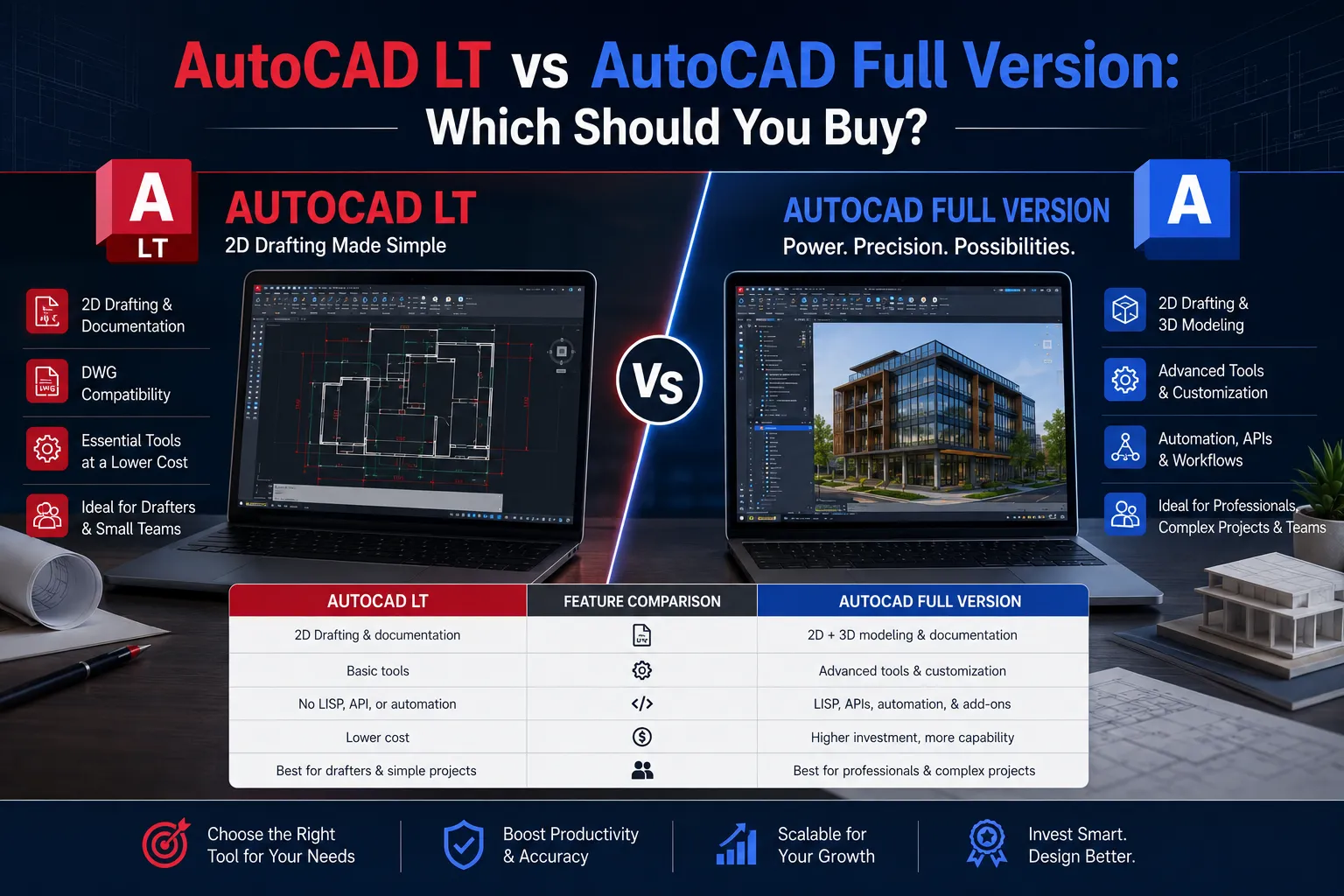
AutoCAD LT vs Full AutoCAD: Which Do You Need?
One of the most common queries among professionals thinking about getting an Autodesk membership is this one, and the response completely depends on what you need to do.
- AutoCAD LT:
- The lighter and less expensive version of AutoCAD is called AutoCAD LT. It fully supports 2D drafting and documentation, and it works flawlessly with the DWG file format. The full version’s web and mobile apps, customization through APIs, 3D modeling capabilities, and access to specialty toolsets (Architecture, Mechanical, Electrical, etc.) are all absent.
- AutoCAD LT is a competent and affordable choice if the majority of your work involves 2D drafting, such as creating building papers, floor plans, elevations, and details. LT is completely adequate for many architectural technicians, drafters, and small businesses who just work in two dimensions.
- Full AutoCAD:
- 3D modeling, the whole collection of discipline-specific toolkits, automation features via APIs, and access to the AutoCAD online and mobile applications are all included in Full AutoCAD. Full AutoCAD is an excellent investment if you require 3D, operate in numerous disciplines, or depend on custom scripts and plugins to automate your process.
- Although complete AutoCAD is more expensive than LT, many professionals find that it efficiently combines multiple specialist programs into a single subscription due to the toolkits that are provided.
- In summary, LT will be useful if you simply draft in 2D. Choose complete AutoCAD if you require automation, discipline-specific tools, or 3D capability.
Autodesk Inventor: 3D Mechanical Design Explained
Autodesk Inventor is designed especially for mechanical engineers and product designers who require advanced 3D mechanical design capabilities, whereas AutoCAD manages drafting across industries and Revit serves the AEC market.
A parametric 3D CAD program called Inventor is used to create exact mechanical parts, assemblies, and documentation. It makes use of constraint-based modeling, which means that parameters determine the dimensions and connections between components. Because the entire model updates when a parameter is changed, design iteration is quick, precise, and manageable.
Part modeling, assembly design, sheet metal design, weldment design, frame analysis, motion simulation, stress analysis, and the creation of intricate 2D drawings straight from 3D models are among Inventor’s primary functionalities. It connects with Autodesk Vault for data management in bigger team contexts and has good compatibility with AutoCAD Mechanical.
From concept to comprehensive manufacturing documentation, Inventor offers manufacturers and product designers a full toolchain. Engineers can save time and money by using its simulation tools to evaluate concepts virtually before committing to actual prototypes.
Along with AutoCAD, Vault, Nastran In-CAD, and other supporting products, Inventor is part of the Autodesk Product Design & Manufacturing Collection.
For whom is an inventor? Product designers, manufacturing engineers, tool designers, mechanical engineers, and anybody else working on the design and documentation of mechanical components and assemblies.
Autodesk Civil 3D for Infrastructure and Civil Engineering
Autodesk’s platform specifically for infrastructure designers and civil engineers is called Civil 3D. Powerful features designed especially for the design, analysis, and documentation of civil engineering projects, such as roads, highways, grading, drainage, and land development, are added to AutoCAD.
Similar to Revit’s parametric logic, Civil 3D employs a dynamic model approach. Alignments, profiles, corridors, surfaces, and pipe networks are among the intelligent objects in the model that are connected to one another. The corridor model, profile, and cross sections dynamically update when a road alignment is altered. This significantly cuts down on the amount of time required for design changes, which are unavoidable on intricate civil projects.
Terrain modeling from survey data, horizontal and vertical alignment design, road and highway corridor modeling, grading and earthworks analysis, stormwater drainage design, and the creation of comprehensive construction drawings and quantity reports are some of the main aspects of Civil 3D.
Engineers may work from real-world survey data obtained by drones or ground-based scanners thanks to Civil 3D’s support for LiDAR data and point cloud imports via ReCap Pro integration.
Civil 3D is usually the primary design platform for infrastructure companies working on transportation, land development, or utility projects; it is frequently used in conjunction with Navisworks for project review and coordination.
For whom is Civil 3D intended? survey teams, municipal engineering departments, land development experts, transportation engineers, and civil engineers.
Fusion 360: Manufacturing and Product Design
Fusion 360, a fully cloud-based platform that integrates CAD, CAM, CAE, and generative design in a single environment, is Autodesk’s vision for the future of product design and manufacturing.
Fusion 360 incorporates the full product development workflow, whereas conventional CAD programs just concentrate on geometry. Within the same program, designers can create toolpaths for CNC machining, model a part, simulate its structural performance under actual loads, and work with team members.
Parametric modeling, direct modeling, sculpting, sheet metal design, and assembly design are all supported by Fusion 360’s CAD features. Modal frequency analysis, thermal analysis, and static stress analysis are all included in its simulation tools (CAE). For milling, turning, cutting, and additive manufacturing, its CAM tools produce machining toolpaths.
Generative design is one of Fusion 360’s most unique characteristics. Generative design uses AI-driven algorithms to create an optimum shape that minimizes material consumption while satisfying load and constraint requirements. The end products are frequently organic-looking structures that would be impossible for a human designer to create by hand, but they are superior structurally and can frequently be produced using contemporary additive manufacturing processes.
The cloud-first architecture of Fusion 360 also facilitates easy collaboration. Design history is automatically monitored and archived in the cloud, and team members may view shared designs from any device.
There are several price tiers for Fusion 360, including a complete commercial subscription for professional users and a startup-friendly version for eligible small businesses.
For whom is Fusion 360 intended? CNC machinists, small manufacturers, startups, makers, mechanical engineers, industrial designers, and product designers.
3ds Max and Maya: Entertainment and Visualization
Not every product made by Autodesk is used in engineering or construction. The industry standard for 3D animation, visual effects, and rendering in movies, TV shows, video games, and architectural visualization is its media and entertainment tools, especially 3ds Max and Maya.
- Autodesk 3ds Max:
- A potent 3D modeling, animation, and rendering program, 3ds Max is frequently used in video games, movies, and architectural visualization. Before a building is constructed, architects utilize it to create photorealistic exterior and interior renderings. It is used by game developers to produce cut-scene animations, scenery, and character models. It is used by VFX artists to create visual effects for movies and TV shows.
- Polygon modeling, spline modeling, texturing, character rigging, particle effects, and dynamics simulation are all available in 3ds Max. It supports different renderers, such as V-Ray, and works natively with Autodesk’s Arnold renderer. Because of its vast plugin ecosystem, studios can greatly increase their capabilities.
- For high-quality rendering and visualization work, architects frequently utilize 3ds Max downstream of Revit. Models are exported from Revit and loaded into 3ds Max.
- Autodesk Maya:
- Maya is the best program for visual effects, film-quality rendering, and 3D character animation. High-end gaming cinematics, animated films, and Hollywood movies all make considerable use of it. Particle systems, fluid simulations, character rigging and animation tools, and Maya’s potent rendering process with Arnold are its main advantages.
- Maya is typically the preferred program for character animation and visual effects work, but 3ds Max is more frequently used for architecture and game environment work. Both are used in the pipelines of many studios.
- The Autodesk Media & Entertainment Collection offers both tools.
- For whom are these tools intended? VFX artists, animators, game developers, visualization architects, film companies, and content producers.
Autodesk Licensing: Subscription vs Perpetual License
Before making a purchase, you must comprehend Autodesk’s license model. Autodesk has shifted its product selection from perpetual licenses to a subscription-based model over the past few years. This change has a big impact on how professionals use and budget for software.
- Subscription Licensing:
- Nowadays, almost all Autodesk products are offered as monthly, yearly, or multi-year subscriptions. The most recent version of the program, access to upgrades and new features as they become available, and usually cloud storage and collaborative tools are all included in subscriptions.
- For the majority of professional customers, annual memberships provide the best value. Multi-year memberships (two or three years) frequently offer pricing certainty over an extended period of time and come with additional savings. Monthly memberships are best suited for short-term project needs and come with a substantial price premium.
- Typically, Autodesk subscriptions are user-based, which means that the license is linked to a specific user’s Autodesk account. Although it can only be actively used on one device at a time, this enables the user to activate the software on up to three devices.
- Perpetual Licenses:
- Many years ago, Autodesk ceased offering new perpetual licenses for the majority of its programs. There are still some older perpetual licenses available through resellers, but they cannot support modern OS systems, integrate with cloud capabilities, or come with regular upgrades.
- A current membership is the best option for the majority of customers since it guarantees that you will always have access to the newest features, security upgrades, and compatibility with modern hardware and operating systems.
- Finding the Best Price:
- Although authorized resellers frequently provide competitive prices, especially for multi-year memberships or bulk orders, official Autodesk pricing is listed on the Autodesk website. With the ease of quick digital delivery, platforms like Elements Keys offer licensed Autodesk memberships at cheap costs.
Autodesk Collections: AEC, Product Design, Media & Entertainment
Collections are the most effective means of obtaining a wide range of products for a single subscription cost for professionals who use several Autodesk applications. At the moment, Autodesk provides three main industry collections.
- Autodesk Architecture, Engineering & Construction Collection (AEC Collection)
- The AEC Collection is intended for professionals in construction, engineering, and architecture. AutoCAD (with all toolsets), Revit, Civil 3D, Navisworks Manage, InfraWorks, Robot Structural Analysis, ReCap Pro, Advance Steel, and a number of additional programs are included.
- The AEC Collection is nearly always more affordable for an architecture business that employs both AutoCAD and Revit than subscribing to each program separately. Because of the variety of tools included, they are also readily available when project requirements change, such as when adding structural analysis or civil engineering capabilities.
- Autodesk Product Design & Manufacturing Collection (PDMC)
- The PDMC is intended for manufacturers, product designers, and mechanical engineers. Inventor, AutoCAD, Fusion 360, Vault Professional, Nastran In-CAD, Moldflow, and more tools are included. From concept design to manufacturing documentation and data administration, this collection offers a whole toolchain.
- Autodesk Media & Entertainment Collection
- Maya, 3ds Max, Arnold, MotionBuilder, Mudbox, and ShotGrid are all part of the Media & Entertainment Collection. It is intended for animation pros, VFX firms, and studios that require the entire Autodesk entertainment toolkit.
- Each collection is offered as an annual or multi-year subscription, and the cost is significantly lower than if you were to buy each tool separately.
How to Buy Autodesk Licenses at the Best Price
It takes some planning to purchase Autodesk software in order to get the greatest deal and steer clear of illegal or fake licenses.
- Buy from authorized sources only: Autodesk licenses must come from Autodesk directly or from authorized resellers. Unauthorized licenses carry real risks — account bans, software deactivation, and potential legal consequences. Elements Keys is a verified platform offering 100% genuine, commercially licensed Autodesk software with safe checkout and instant email delivery. As a site dedicated to Autodesk keys, Elements Keys is purpose-built for professionals who want the right license at a fair price, without the hassle.
- Choose the right term: Multi-year subscriptions (two or three years) typically offer the best per-year pricing. If you’re a professional who’ll be using the software long-term — which most are — locking in a multi-year rate through Elements Keys is a smart financial decision.
- Consider collections over individual products: If your work involves more than one Autodesk tool, a collection almost always beats individual subscriptions on price. Elements Keys carries collection licenses including the AEC Collection, making it easy to compare and purchase in one place.
- Look for educational pricing if eligible: Autodesk provides free access to most tools for students and educators through its Education Community. This is ideal for learning — but commercial work always requires a commercial license.
- Read the license terms: Educational and startup tiers restrict commercial use. Always confirm the license type matches your use case before purchasing. Elements Keys makes license types clear on every product listing, so there’s no guesswork.
Autodesk System Requirements and Compatibility
Make sure your hardware satisfies the system requirements before buying or installing Autodesk software. For every product, Autodesk specifies comprehensive requirements that differ depending on the application and version.
General Requirements Across Most Autodesk Products:
- Operating System: Windows 10 and Windows 11 (64-bit) are supported by the majority of Autodesk applications. Product support for macOS varies; some programs, such as Revit and Civil 3D, are Windows-only, but AutoCAD, Fusion 360, and a few others support macOS Monterey and later.
- Processor: For professional use, an AMD Ryzen 7 or Intel Core i7 or higher is advised. Higher core counts greatly enhance performance for work that involves a lot of simulation.RAM: 16GB is advised for pleasant use, although 8GB is the minimum for the majority of items. 32GB or more offers significantly better performance for Revit on huge models or Civil 3D on complicated projects.
- RAM: 16GB is advised for pleasant use, although 8GB is the minimum for the majority of items. 32GB or more offers significantly better performance for Revit on huge models or Civil 3D on complicated projects.
- Graphics: For 3D work, a dedicated GPU with at least 4GB of VRAM is advised. A suitable NVIDIA GPU with CUDA support allows for GPU-accelerated rendering using Arnold in 3ds Max or Maya, significantly cutting down on render times.
- Storage: For Autodesk programs, SSD storage is highly advised. Quicker storage speeds enhance responsiveness, file open/save performance, and load times. The amount of storage space that is available should also be taken into account for large project files in Revit or Civil 3D.
- Internet Connection: Periodic online validation is required for Autodesk subscriptions. Fusion 360 and BIM Collaborate Pro’s cloud-connected functionalities need reliable internet access.
Before making a purchase, it is always advisable to check the specific system requirements for the product you have selected on the Autodesk website, as these requirements are revised with every new version release.
FAQ: Top 10 Autodesk Questions Answered
What is the most popular Autodesk software?
The most popular product from Autodesk worldwide is AutoCAD, which is followed by Fusion 360 for product design and manufacturing and Revit in the AEC sector.
Are AutoCAD and Autodesk the same thing?
No. The company is called Autodesk. Autodesk produces a variety of software applications, including AutoCAD. More than 100 products from various industries are part of Autodesk’s portfolio.
Can I use Autodesk software for free?
Through the Autodesk Education Community, Autodesk provides educators and students with free access to the majority of its products. For small enterprises that meet the requirements, Fusion 360 also offers a startup tier. For a brief time, the majority of commercial products provide free trials.
What is the difference between Revit and AutoCAD?
AutoCAD is a versatile drafting program that can be used to create technical drawings in two and three dimensions. For the purpose of building design and construction, Revit is a platform for building information modeling that generates intelligent, data-rich 3D models. They are frequently used in tandem and have distinct functions.
Does Autodesk still sell perpetual licenses?
No. A few years ago, Autodesk stopped selling new perpetual licenses. Monthly, yearly, or multi-year subscription options are offered for any new Autodesk products.
What is included in the AEC Collection?
AutoCAD (with all toolsets), Revit, Civil 3D, Navisworks Manage, InfraWorks, Robot Structural Analysis, ReCap Pro, Advance Steel, and other products for professionals in architecture, engineering, and construction are all included in the AEC Collection.
What is the difference between Fusion 360 and Inventor?
Although they are both mechanical design tools, their applications differ. Large, intricate mechanical assemblies are better suited for Inventor, which also interfaces with Vault for enterprise data management. Product design, smaller teams, and manufacturing workflows are all good uses for Fusion 360, a cloud-based program that combines CAD with CAM and simulation.
Can I run Autodesk software on a Mac?
AutoCAD and Fusion 360 are two Autodesk tools that work with macOS. Some are currently exclusive to Windows, such as Revit and Civil 3D. Prior to making a purchase, always review the system requirements for the particular product
What is Autodesk Arnold?
Solid Angle created Arnold, a top-notch physically based rendering engine that Autodesk purchased. It is a popular tool for creating lifelike renderings in film and animation production, and it is incorporated into Maya and 3ds Max. Both CPU and GPU rendering are supported.
Where can I buy Autodesk software at the best price?
Licenses for Autodesk can be bought via authorized resellers or directly from Autodesk. Platforms like Elements Keys are a quick and dependable way to buy authentic, commercially licensed Autodesk subscriptions at competitive prices with rapid email delivery.